Answering the search for a reliable e notebook with a pen, this guide highlights five standout options. Each choice suits different needs, from distraction-free writing to robust cloud syncing and portable note-taking. The top picks include a high-contrast, paper-like Kindle Scribe experience, a battery-free pen option, a multi-language transcription device, a reusable smart notebook, and a compact color paper tablet. The buyer types below reflect who each product is best for—students, professionals, creatives, and travelers.
| Product | Best For |
|---|---|
| Amazon Kindle Scribe Colorsoft 64GB (Graphite) | Readers who want built-in notes on an 11” display, with pen that requires no charging |
| HUION Note E Digital Notebook | Professionals on the go needing a battery-free pen and fast handwriting |
| Amazon Kindle Scribe (16GB Tungsten) | Users seeking AI-assisted note tools and a unified device for notes, documents, and books |
| iFLYTEK AINOTE Air 2 Bundle | Multilingual note-taking with accurate voice-to-text and handwriting-to-text conversion |
| Rocketbook Core Reusable Smart Notebook | Students and teams needing cloud-friendly reuse and easy organization |
Amazon Kindle Scribe Colorsoft 64GB — Graphite

The Kindle Scribe Colorsoft combines an 11” Colorsoft display with a front light and a built-in notebook. This model emphasizes a high-contrast, paper-like color and a textured writing surface that feels natural. It includes a Premium Pen that requires no charging. Best for readers who want seamless switching between ebooks, documents, and handwritten notes on one device. Caution: color-based paper-like display may feel less crisp for those who prefer stark black-and-white writing surfaces.
Amazon Kindle Scribe (16GB) — Tungsten

This Kindle Scribe offers AI notebook summarization and a built-in notebook, with a Premium Pen for an authentic writing feel. It is best for those who want AI-assisted tools to transform notes, summarize content, and maintain a single device for reading and writing. Limitation to consider: AI features may require ongoing software services and cloud connectivity to unlock full capabilities.
HUION Note E Digital Notebook

The HUION Note E is an 8.4” Android e-notebook with a battery-free magnetic pen and 18W fast charging. It features 8192 pressure levels, ultra-low latency, and native handwriting-to-text conversion in multiple languages. It’s best for professionals and students who need a portable, all-day writing slate with quick access to editable text. Limitation: smaller screen size may feel cramped for lengthy writing sessions and complex documents.
iFLYTEK AINOTE Air 2
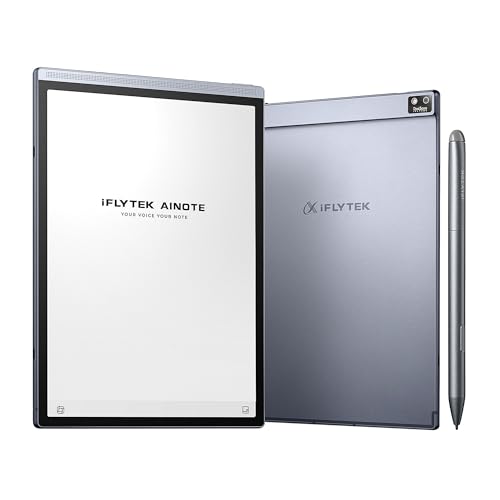
The AINOTE Air 2 bundles an 8.2” E Ink screen with real-time voice-to-text and multi-language transcription. It supports handwriting-to-text in 83 languages and offers a paper-like writing experience with 4096 pressure levels. Best for multilingual users, meeting-heavy workflows, and those who need quick transcription alongside handwriting. Caution: voice transcription and handwriting conversion cannot be used simultaneously, so plan your workflow accordingly.
Rocketbook Core Reusable Smart Notebook
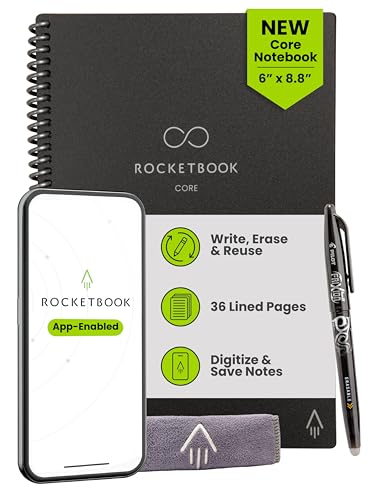
The Rocketbook Core uses premium reusable paper with Smart Titles and Smart Tags to name and organize files. It pairs with an app to scan and upload notes to cloud services like Google Drive, Dropbox, or OneNote. This option is ideal for students and teams who want a reusable notebook that integrates with cloud storage. Limitation: requires regular wiping with a damp cloth and relies on the app for cloud storage and organization.
Buying Guide
What should you consider when choosing an e notebook with a pen?
- Display and writing feel: Look for paper-like surfaces, color options, and latency. If you write a lot, a larger display can reduce eye strain.
- Pen experience: Battery-free pens are low-maintenance but ensure the pen’s feel matches your handwriting. Some pens require charging or pairing.
- Note-taking ecosystem: Check whether the device stores notes locally or in the cloud, and what apps or services it supports for easy export and sharing.
- Transcription and AI features: Decide if you want AI-powered summarization or handwriting-to-text conversion, and whether those tools operate offline or require an online subscription.
- Multilingual support: If you work across languages, prioritize devices with robust transcription in multiple languages.
- Reuse and organization: If you want a reusable notebook, consider Rocketbook’s wipeable pages and how well its cloud integrations align with your workflow.
FAQ
- What is an e notebook with pen best used for? It suits note-taking, drafting, sketching, and reading in a single device, with the pen enabling handwriting and drawing.
- Do these devices support cloud syncing? Most options offer cloud integration; check each model for the specific services supported.
- Can AI features replace traditional note-taking? AI tools can summarize or convert handwriting, but many users still prefer manual writing for certain tasks.
- Is a battery-free pen more convenient? Battery-free pens require no charging or pairing, which can simplify daily use, but ensure the writing feel meets your preferences.
- Which device is best for multilingual users? Devices with multi-language transcription and recognition, such as the iFLYTEK AINOTE Air 2, are designed for diverse language needs.
- Can I reuse Rocketbook pages indefinitely? Yes, pages are wipeable, allowing repeated use, but the process depends on regular cleaning and proper drying.