Find the right labels for mailing, shipping, and organization with options designed for easy printing and reliable adhesion. This guide highlights top picks that suit small business owners, home office organizers, and anyone who wants efficient, clean labeling. Each product is chosen for clear print quality, compatible printing formats, and strong adhesion. Read on to compare 20-up options and solid alternatives that fit similar needs.
Summary at a glance:
| Product | Best For |
|---|---|
| White Address Labels 1″ x 4″ – 500 Labels | Shipping and product labeling with standard 20-up format |
| HouseLabels 4,000 Labels, 20-Up – 4″ x 1″ | Bulk labeling for large mailings or inventory tagging |
| Premium Label Supply White 4″ x 1″ – 500 Labels | General-purpose, durable adhesive for multiple surfaces |
| Avery Easy Peel 1″ x 4″ – 500 Labels (08161) | Reliable feed, easily printed and peeled |
| Avery Easy Peel 1″ x 4″ – 500 Labels (8160) | Convenient 4″ x 1″ labeling for bulk shipping needs |
White Address Labels 1″ x 4″ Mailing Shipping Product Stickers – 500 Labels

Best for: Small to medium shipping tasks and inventory tagging. These matte labels provide sharp text and clear barcodes, making them suitable for professional-looking mailings and product labeling. The backing uses a permanent adhesive for envelopes, boxes, and storage containers. Choose this if you need reliable adhesion on varied surfaces and clear prints.
Caution: Adhesive performance can vary on low-energy plastics or very glossy finishes.
HouseLabels 200 Sheets; 4,000 Labels, 20-UP, Shipping/Mailing Labels (4.0″ x 1.0″) – BPA Free

Best for: Offices and warehouses that print large batches. This option provides a high label count per package with a 4″ x 1″ size that works well for shipping, inventory tags, and general labeling. The labels are described as White with rounded corners and strong adhesive for flat surfaces. They are compatible with laser or inkjet printers.
Limitation: Bulk sheets may require a dedicated label tray or feeder depending on the printer model.
Premium Label Supply White Sticker Address Labels – 4″ x 1″ – 500 Total Adhesive Labels

Best for: Versatile use across mailing, tagging, and organizing projects. The sheets are standard letter size (8.5″ x 11″) and are compatible with all laser and inkjet printers. A strong general-purpose permanent adhesive helps the labels stick to many surfaces including paper, cardboard, and plastic.
Limitation: For best results, ensure your printer settings are matched to label dimensions to avoid misalignment.
1″ x 2-5/8″ Address Labels 900 Labels – 8.5″ x 11″ White

Best for: Bulk shipping and organizational labeling with a slightly smaller footprint. The matte surface reduces ink smudges, and printable templates are available for download in PDF and Word formats. Ideal for bulk mailing and classroom labeling.
Limitation: Not a 20-up sheet format, so print efficiency may vary by printer and sheet layout.
Avery Easy Peel Printable Address Labels 1″ x 4″ White – 500 Blank Mailing Labels (08161)

Best for: Printers that benefit from Sure Feed reliability and Easy Peel with a pop-up edge. Suitable for mailing and shipping labels, as well as product labeling and organization. The design helps prevent jams and misfeeds, with templates available for easy customization.
Limitation: Some printers may require manual alignment if the printer tray feed is not calibrated for label sheets.
LabelChoice 100 Sheets 3000 Pcs 30-Up 1″ x 2-5/8″ Labels

Best for: Printers with 30-up layouts and users needing large-volume labeling with easy sheet removal. While not 20-up, these are compatible with laser and inkjet printers and come with templates for quick setup.
Limitation: Not a 20-up format; may require more pages to achieve the same label count per job.
KKBESTPACK Half Sheet Shipping Labels – 2 Per Page – 8.5 x 5.5 (200 Labels)
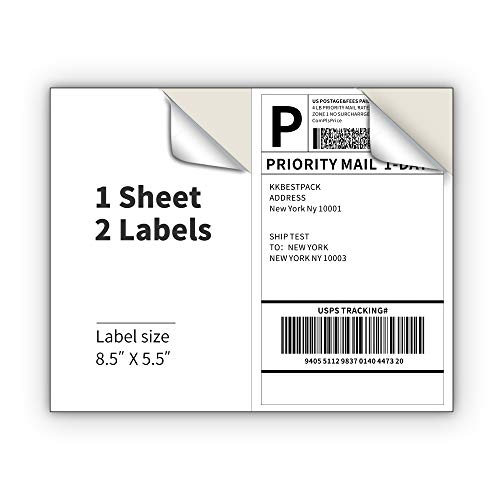
Best for: When you need pre-scored half-sheet labels for bulk shipping. The 2-per-page format makes them efficient for certain packaging workflows. Use this if you specifically require half-sheet format compatibility.
Limitation: Not a 20-up option; printing efficiency is different from 20-up layouts and may require different printer settings.
Buying Guide
What to consider when selecting label sheets for 20-up printing and similar tasks:
- Label size and format: Ensure the size (e.g., 4″ x 1″ or 1″ x 4″) matches your printer’s capabilities and your labeling needs. 20-up formats are common for mailing labels but verify how many labels print per sheet.
- Printer compatibility: Check if sheets are labeled for laser, inkjet, or both. Some brands specify compatibility and provide templates for easy design integration.
- Adhesive type: Permanent adhesives work well on envelopes, boxes, and storage containers, but some surfaces may require repositionable or stronger options depending on the material.
- Surface finish: Matte surfaces help prevent smudging and ensure sharper text and barcodes, which is important for scanning during shipping and inventory.
- Templates and design tools: Availability of downloadable templates (PDF, Word, or design software) can speed up setup and reduce misprints.
- Volume and value: For frequent labeling, bulk packs (e.g., 100 sheets or thousands of labels) lower cost per label and reduce refill frequency.
- Printer feeding issues: Some users experience misfeeds; choosing labels with reliable feed technology helps minimize jams and skewed prints.
Frequently Asked Questions
What does 20-Up mean?
20-Up refers to the number of labels printed per sheet in a given layout, typically a standard sheet with 20 labels arranged in a grid. It helps maximize printing efficiency for mailing labels.
Are 4″ x 1″ labels good for shipping?
Yes. The 4″ x 1″ size is a common shipping label size that fits many carriers’ requirements and provides enough space for addresses and barcodes.
Can these labels be used with both laser and inkjet printers?
Many labels are designed for either laser, inkjet, or both. Check the product features for printer compatibility and available templates.
What should I do if labels jam in my printer?
Ensure you are using the correct label type, check alignment settings, and adjust the printer’s label feed guide. Use the manufacturer’s templates to minimize misalignment.
Are these labels suitable for quick organization?
Yes. Label sheets of this type are ideal for addressing, inventory tagging, file labeling, and other organization tasks, thanks to clear print and strong adhesion.