Answering the demand to print photo books and memories directly from your phone, these top handheld and desktop printers let you transform digital images into tangible keepsakes. The best choices suit busy travelers, scrapbookers, and families who want quick, sturdy prints without complex setups. Below, find five well-rounded options that cover pocket-size portability and desktop convenience, each with a quick buyer-focused note and a practical caveat.
| Product | Best For | Format | Connectivity |
|---|---|---|---|
| KODAK Step Instant Mobile Printer | On-the-go selfie lovers | 2×3” sticky-back photos | Bluetooth, NFC |
| Canon Ivy 2 Mini Photo Printer | Compact home and travel prints | 2×3” sticky-back prints | Bluetooth |
| KODAK Mini 2 Retro | Casual photographers who want quick color prints | 2×3” photos | Bluetooth |
| HP Sprocket Portable 2×3” Printer (Black Noir) | Party prints with friends | 2×3” sticky-back prints | Bluetooth |
| KODAK Dock Era | Desk setup for frequent prints | 4×6” prints | Bluetooth |
KODAK Step Instant Smartphone Photo Printer

The KODAK Step Printer connects to any iOS or Android device via Bluetooth or NFC, turning selfies and social posts into 2×3” sticky-back prints. It uses Zero-Ink technology with ZINK paper for durable, moisture- and tear-resistant photos. The built-in editing suite lets users create collages, apply filters, borders, and stickers before printing. This is best for: mobile users who want immediate, personalized snapshots for scrapbooks or quick gift tags. Caution: expect per-print costs with ZINK paper and ensure you have enough starter paper for a busy week of photos.
Canon Ivy 2 Mini Photo Printer

The Canon Ivy 2 Mini uses ZINK technology with sticky-back 2×3” prints. The Canon Mini Print App handles photo selection and customization, enabling quick edits and direct printing from mobile devices. This option is best for: users who want a compact, wall-friendly option for quick, adhesive prints on scrapbooks or wall decor. Caution: print speed is typical for mini printers; larger batches may require patience during events or gatherings.
KODAK Mini 2 Retro 2×3 Portable Printer
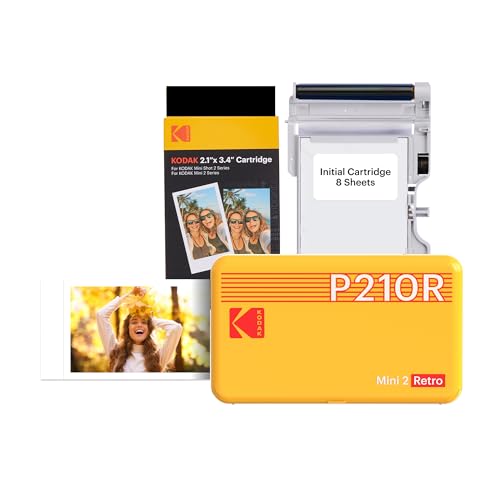
The KODAK Mini 2 Retro uses genuine 4PASS dye sublimation to produce quick, durable 2×3” prints with a protective lamination. It connects via Bluetooth and is designed for ease of use, ideal for first-time users who want reliable, instant color prints. This is best for: quick, casual prints during trips or gatherings. Caution: glossy prints can be sensitive to fingerprints and glare in bright light; handle prints with care to maintain finish.
HP Sprocket Portable 2×3” Printer (Black Noir)

The Sprocket prints 2×3” photos on Zink sticky-backed paper and supports multiple devices printing simultaneously. An LED indicator helps identify printing activity, and augmented reality features let users view a virtual queue with the Sprocket app. This is best for: party planners and social groups who want quick, shareable prints. Caution: the vibrant color depth is good, but batch printing may require paper refills during large events.
KODAK Dock Era 4×6” Desktop Photo Printer

The Dock Era offers desktop 4×6” color prints via Bluetooth with an integrated docking station that charges your phone during printing. It uses 4PASS dye sublimation for detailed, durable prints with a protective laminate. This is best for: home and small-office users who want a dedicated printer for frequent 4×6” photos. Caution: larger print size means a bigger footprint on a desk; ensure you have a stable workspace.
Buying Guide: How to Choose the Right Phone-To-Print Solution
- Print size and format: Choose 2×3” or 4×6” prints based on your intended use—stickers, scrapbooks, or wall decor. 2×3” is highly portable; 4×6” makes better display photos.
- Portability vs. desk setup: For travel or on-the-go printing, consider compact models like the Canon Ivy 2 Mini or KODAK Step. For frequent at-home printing, a desk printer like Dock Era offers a stable workflow.
- Paper and ink approach: All listed models use Zink or dye-sub processes that don’t require traditional ink cartridges. Review paper cost and availability, as ongoing paper purchases impact long-term costs.
- App capabilities: Look for editing features (filters, borders, stickers) within the printer’s companion app. If you want collage modes or AR features, check the app’s options before purchasing.
- Ease of use: If you want quick prints with minimal steps, prioritize models marketed for “easy setup” and “instant printing” with straightforward Bluetooth pairing.
- Durability and finish: Consider whether you need laminated finishes or peel-and-stick backs for immediate placement on walls, notebooks, or planners.
FAQ
- Can I print photo books directly from a phone?
Some printers enable single-image prints that you can later arrange into a photo book, but most devices focus on individual 2×3” or 4×6” prints rather than bound books. Use a photo book app to compile pages from multiple prints. - Do these printers require ink cartridges?
No. The listed models use zero-ink (ZINK) or dye-sub paper that contains embedded color crystals, eliminating traditional ink cartridges. - Is the print quality good for photos?
Print quality varies by device and paper, but modes like dye sublimation provide durable, detailed prints with lamination. Expect strong color reproduction for everyday photographs and memories. - Are the prints sticky-back?
Several models offer sticky-back paper, enabling direct placement on surfaces. If you don’t want adhesive photos, choose standard paper variants without sticky backing. - Which device is best for travel?
The KODAK Step, Canon Ivy 2 Mini, and HP Sprocket are particularly portable and well-suited for on-the-go printing from a smartphone. - What is the typical print speed?
Mini 2×3” printers generally print within seconds per photo; desktop models like Dock Era print 4×6” photos quickly but require more desk space and setup time.